

XForms validation
I recently got a question from a partner if it is possible to add validation to check if two fields are equal to each other. The scenario was that a user is asked for their email address and then asked to confirm it. I have already blogged about how to add a simple regular expression validation but this requires a bit more code but not much. Anders Hattestad wrote a great blog post on how to extend XForms and with the help of his blog post I got my validation working.
I start by adding a regular expression validation in my global.asax.
1: protected void Application_Start(Object sender, EventArgs e)
2: {
3: EPiServer.XForms.DataTypes.Types.Add("Similar", "aretheysimilar");
4: XFormControl.ControlSetup += new EventHandler(XForm_ControlSetup);
5: }
This is only done to get the validation to show up in our drop down list.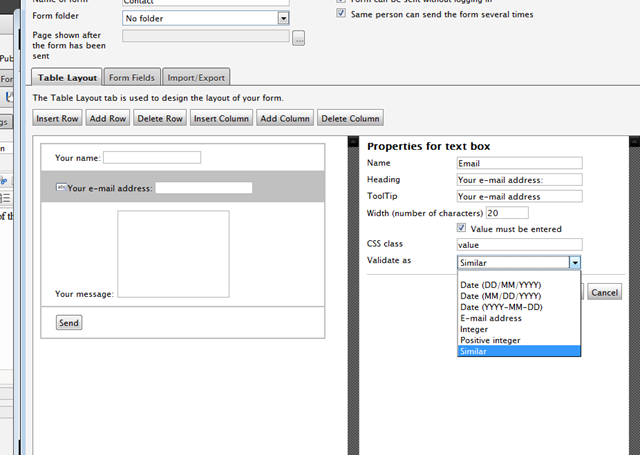
When I select two different textboxes I mark both as similar in the drop down list.
On the event control.ControlsCreated += I attach and add some code.
First thing I do is that I try to find the regular expression validation added with my dummy regex.
1: List<string> equalcontrolstocheck = new List<string>();
2: List<string> removecontrols = new List<string>();
3: foreach (Control item in formControl.Controls)
4: {
5: if (item is System.Web.UI.WebControls.RegularExpressionValidator)
6: {
7: if (((RegularExpressionValidator)item).ValidationExpression == "aretheysimilar")
8: {
9: Control c = formControl.FindControl(((RegularExpressionValidator)item).ControlToValidate);
10:
11: equalcontrolstocheck.Add(c.ID);
12: removecontrols.Add(item.ID);
13: }
14: }
15: }
I then add the controls to a list and the controls they validate. I then remove the regular expression validation controls and add a compare control saying that both controls should be equal
1: if (equalcontrolstocheck.Count > 1)
2: {
3:
4: formControl.Controls.Remove(formControl.FindControl(removecontrols[0]));
5: formControl.Controls.Remove(formControl.FindControl(removecontrols[1]));
6:
7: CompareValidator comparevalid = new CompareValidator();
8: comparevalid.ControlToValidate = equalcontrolstocheck[0];
9: comparevalid.ControlToCompare = equalcontrolstocheck[1];
10: comparevalid.Type = ValidationDataType.String;
11: comparevalid.Operator = ValidationCompareOperator.Equal;
12: comparevalid.Text = "They do not match";
13: comparevalid.ID = "emailisequal";
14: comparevalid.Display = ValidatorDisplay.Dynamic;
15: comparevalid.ValidationGroup = "XForm";
16:
17: formControl.Controls.Add(comparevalid);
18:
19: }
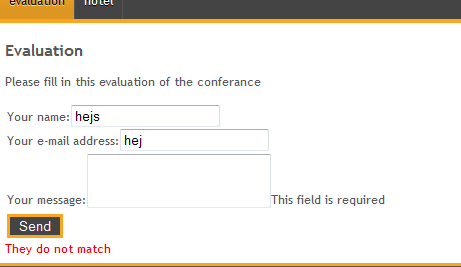
The end results are that if they are not equal it will show

Comments